Run your school, from preschool to university.

Enrolments, courses, marks, payments and dashboards: Classe Pilote brings all of your school’s management into one software, built for your teams.

15-day free trial · No credit card · No commitment

A year with Classe Pilote

01 Before term starts · Back to school

Your new year is ready before the first lesson.

Open the year in a morning: terms or semesters, classes, tracks, programmes and coefficients. Enrolment requests come in, records are created with their documents, and every pupil or student gets a place.

  • Terms or semesters, at your pace
  • Classes, tracks and coefficients
  • Online pre-enrolment and required documents
  • A waiting list kept up to date
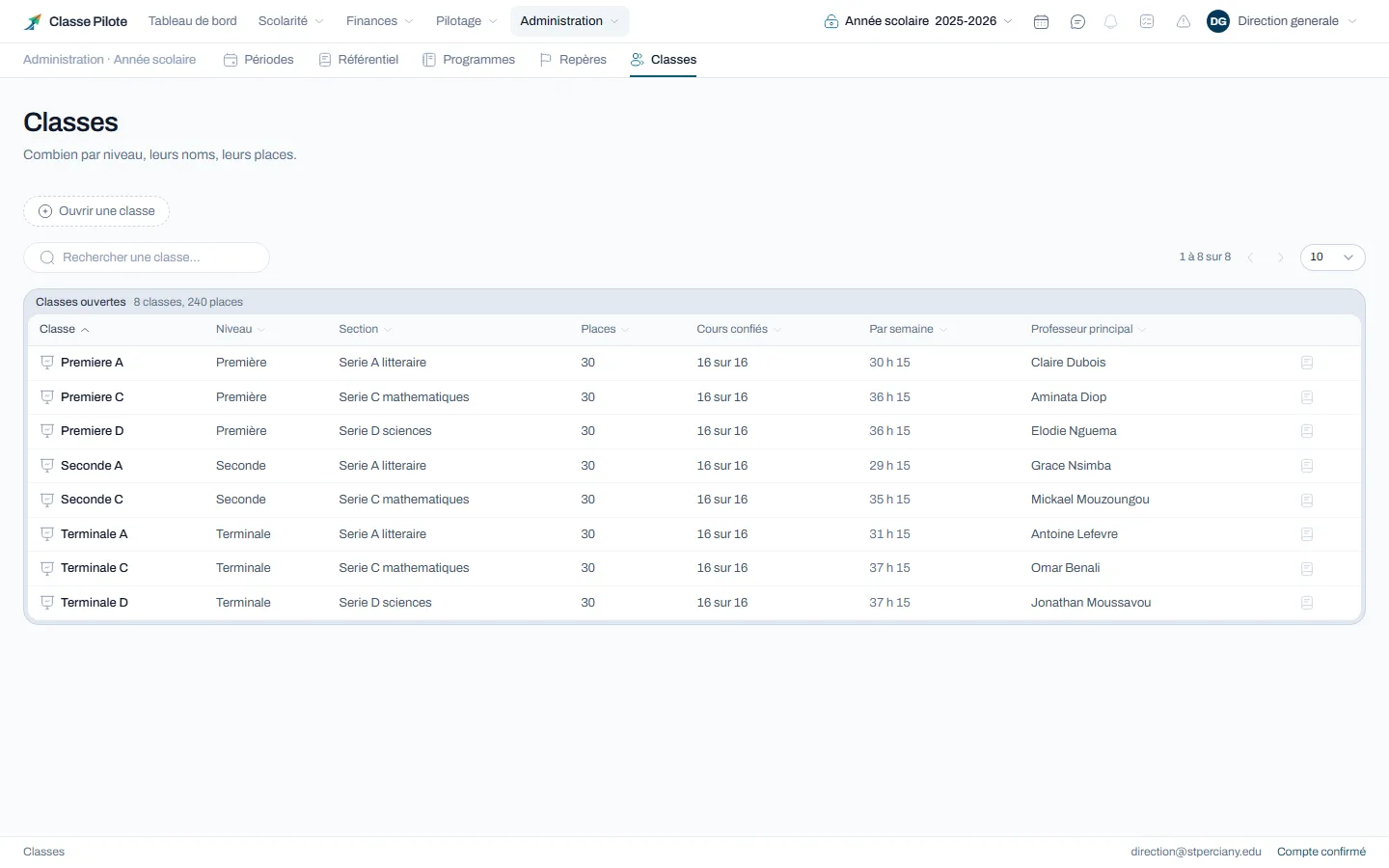
The classes open for the year, with their track, places and form teacher
  1. Back to school
  2. Day to day
  3. Results
  4. Families
  5. Finances
  6. Management
  7. What comes next

A year with Classe Pilote

01 Before term starts · Back to school

Your new year is ready before the first lesson.

Open the year in a morning: terms or semesters, classes, tracks, programmes and coefficients. Enrolment requests come in, records are created with their documents, and every pupil or student gets a place.

  • Terms or semesters, at your pace
  • Classes, tracks and coefficients
  • Online pre-enrolment and required documents
  • A waiting list kept up to date
The classes open for the year, with their track, places and form teacher

02 Every day · Day to day

Parents hear about an absence the same day.

The timetable is set once for the year. At every lesson, the teacher takes the register from their phone in a few seconds, and the absence is recorded for the whole school.

  • Timetable by class, teacher and room
  • Register taken in seconds
  • Families alerted the same day
  • Justifications and sanction thresholds
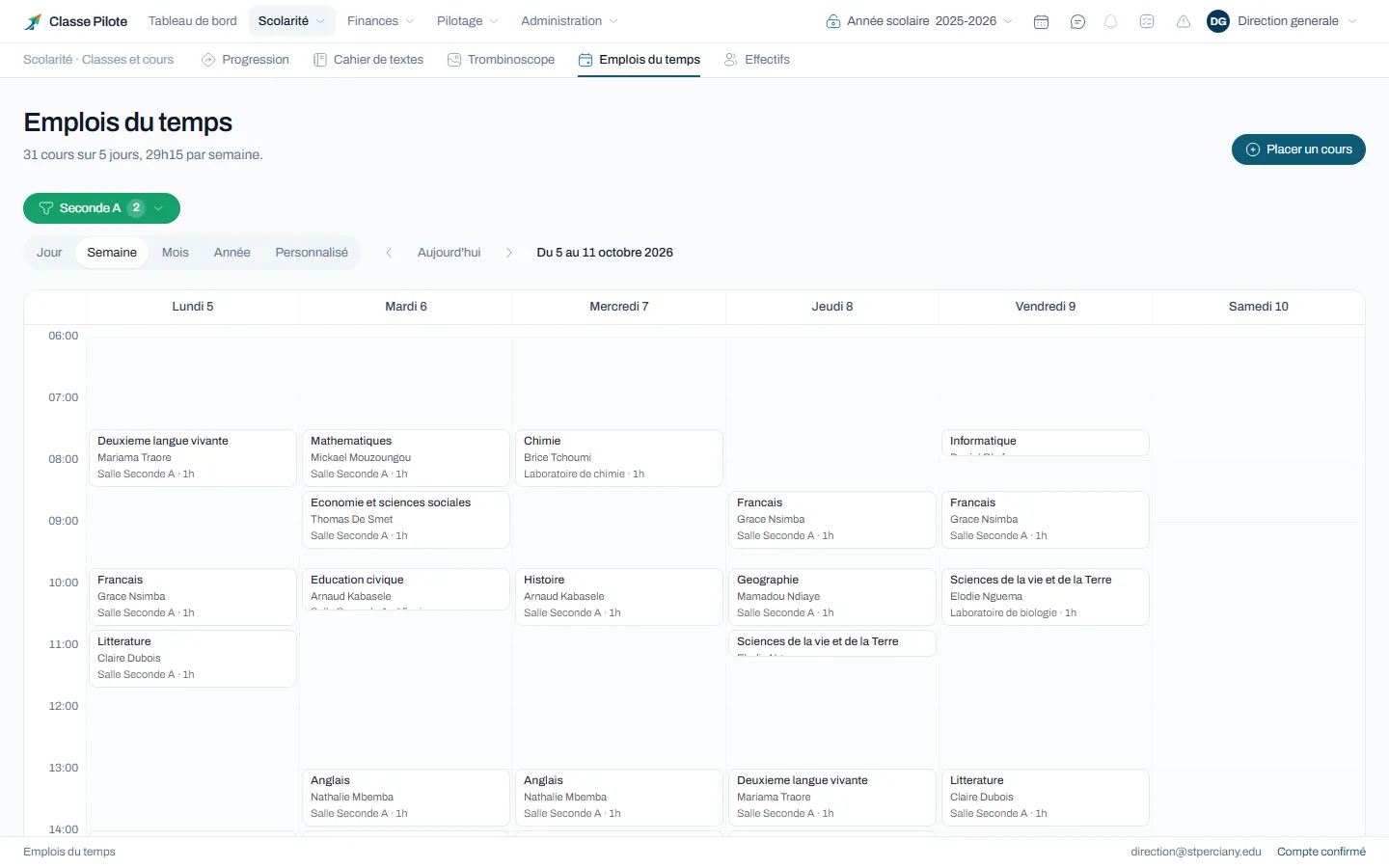
A class timetable over a week, with subjects, teachers and rooms

03 End of term · Results

Report cards ready on council day, without a night of sums.

Each mark goes in test by test. Averages, ranks and distinctions are computed with your coefficients and your grading scale, out of 10, 20 or 100. On council day, the leadership team records the decisions and prints the whole class at once.

  • Marks entered test by test
  • Averages, ranks and distinctions computed
  • Class councils and their decisions
  • Report cards and transcripts printed at once
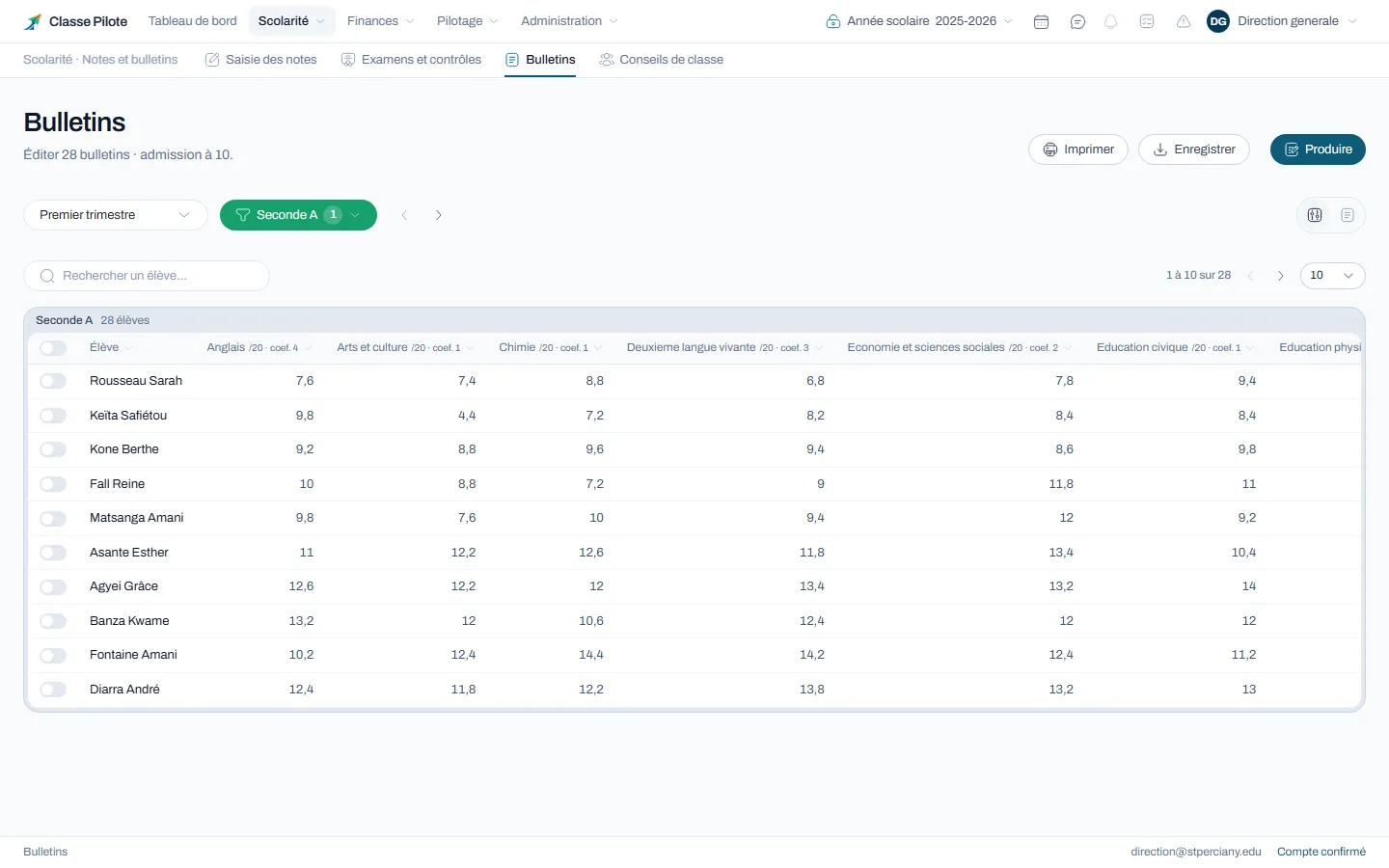
The report cards of a class, with the average for each subject and its coefficient

04 All year · Families

Parents follow their child from their phone.

Each parent has their own space, linked to their children by the school: absences, marks, report cards, due dates and receipts, always up to date. At university, students check their own space.

  • Parent space linked by the school
  • Student space with its own access
  • Absences, marks, report cards and due dates
  • Email included, SMS as an option
A mother and her daughter look at results on a tablet

05 Every month · Finances

You know every day who has paid and what is still due.

Set your fees once: by level, by option, in one payment or in instalments. At the desk, in cash, by Mobile Money or by bank transfer, every payment gives a numbered receipt and is spread over what the family owes.

  • Fees by level and by option
  • Instalment plans
  • Numbered receipts at the desk
  • Grants and discounts with their reason
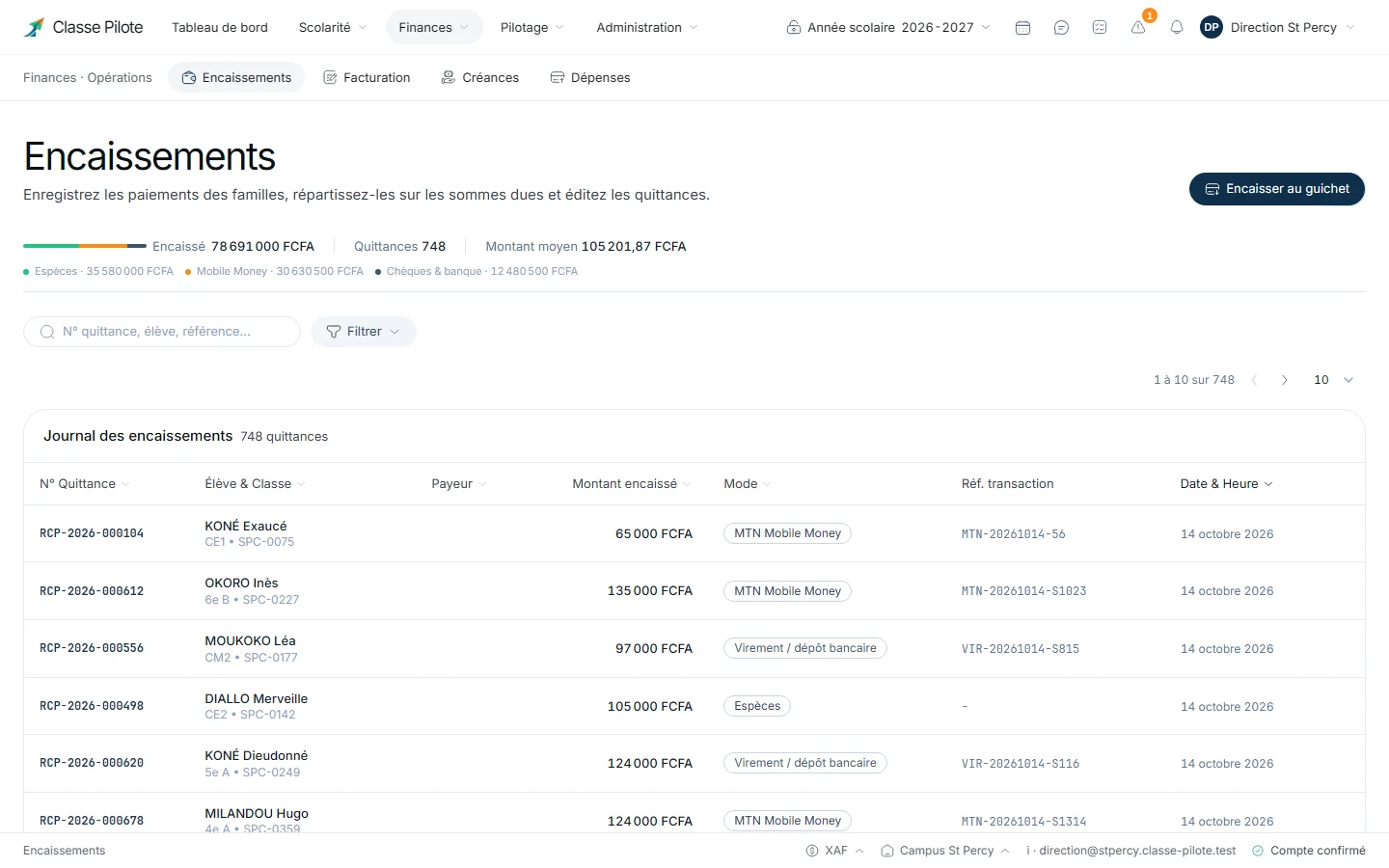
The collections log, with the receipt number, the student, the amount and the payment method

06 At any time · Management

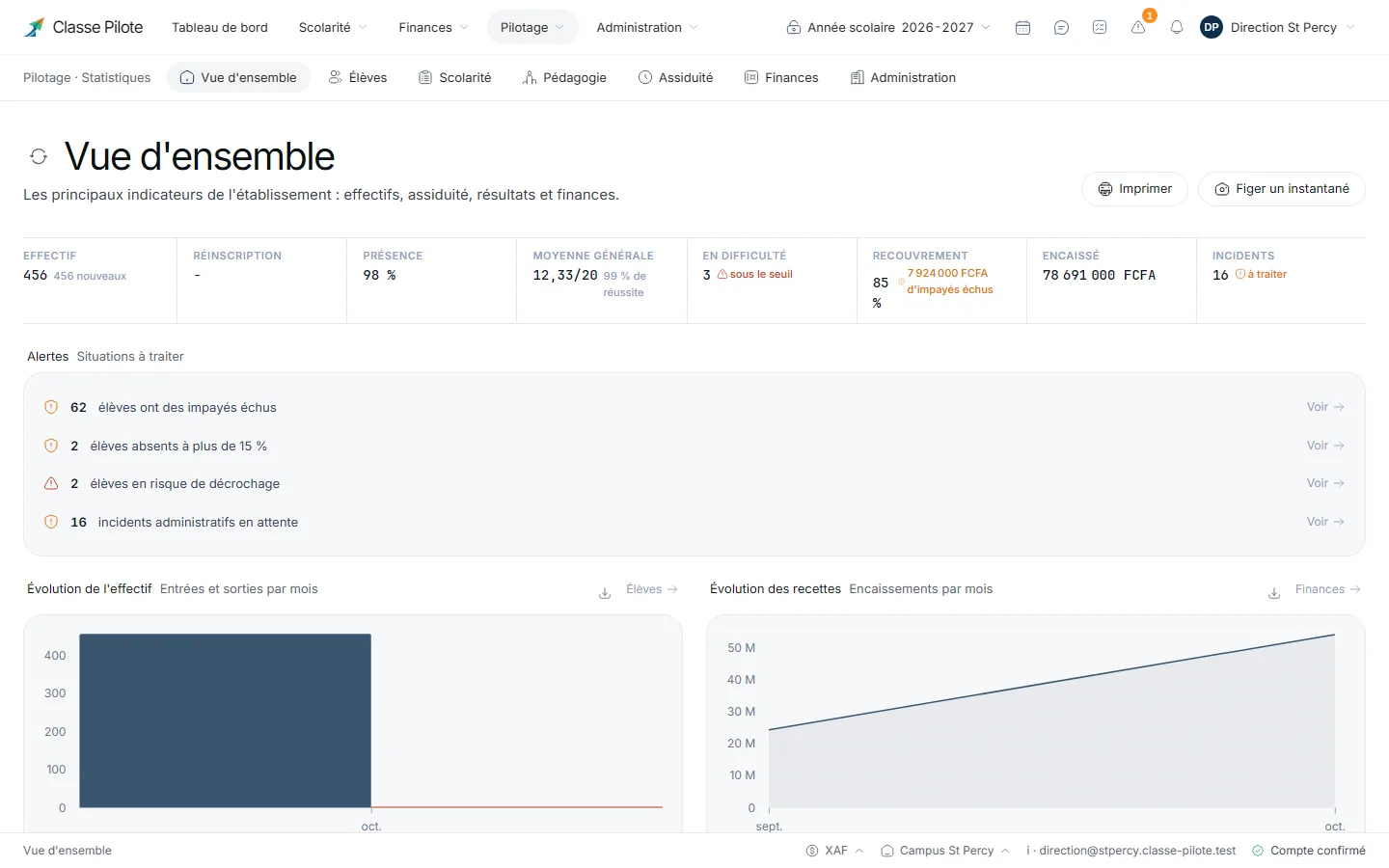
Your whole school on a single screen.

Enrolment, attendance, results, fee collection: the overview fills itself with what your teams enter every day. It flags the students who are starting to fall behind, while there is still time to act.

  • An overview of the school
  • Results by class and by subject
  • Students in difficulty spotted
  • An audit log of every sensitive action
The school overview: enrolment, attendance, overall average, fee collection and alerts

07 End of year · What comes next

Close the year, the next one is already ready.

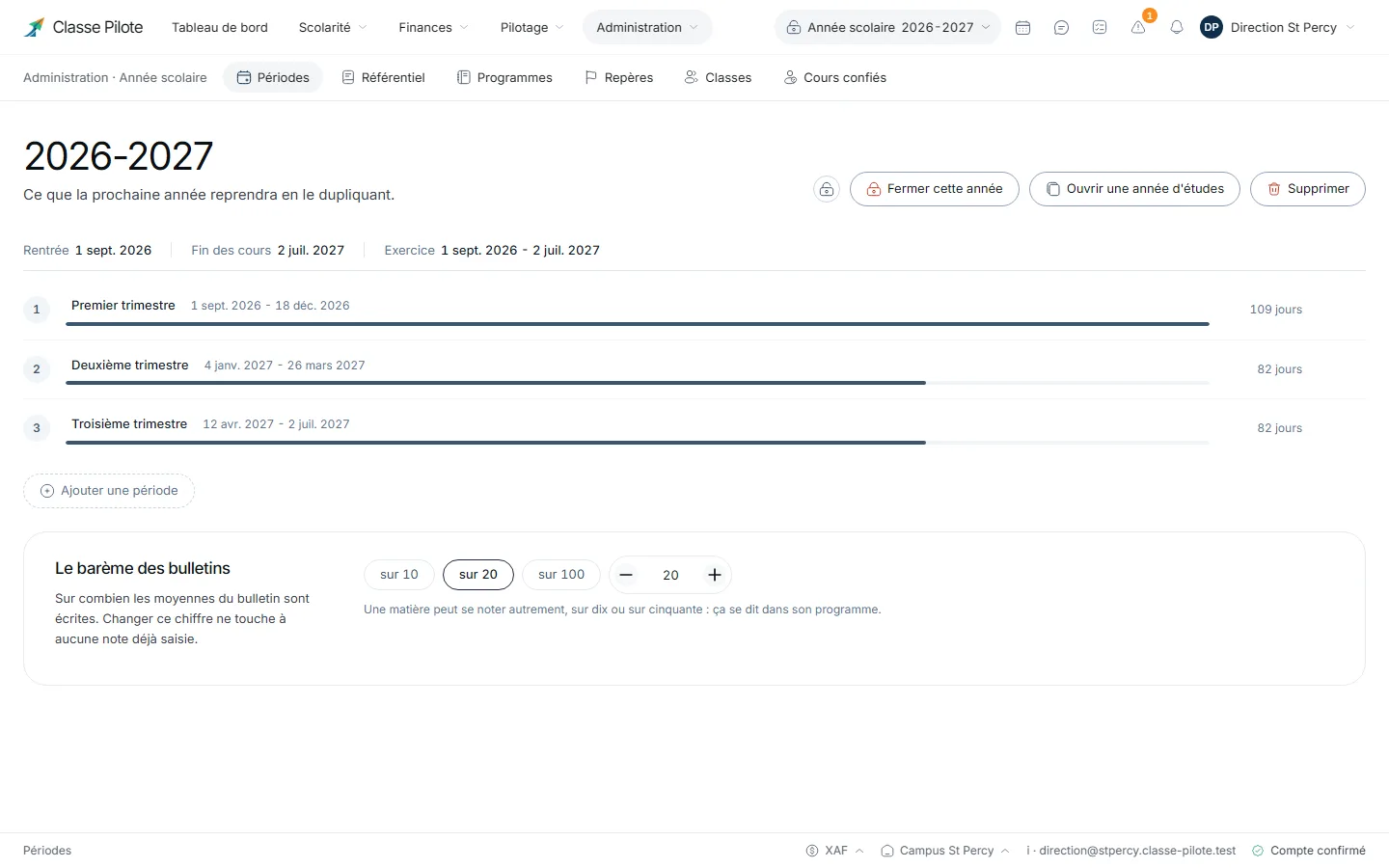
One button closes the year: marks, payments and decisions become read-only and stay available. The new year takes over your classes, programmes and fees, and every student moves to the class decided by the council.

  • The year closed in read-only mode
  • Classes, programmes and fees carried over
  • Students moved up as the council decided
  • History available year after year
The school year and its three terms, with the button to close the year

From the first day to year-end closing, Classe Pilote keeps what the school records: students, courses, marks, payments. Everyone works on the same data, and the next year picks up from there.

What you can manage

Schooling

Complete student records, class assignment, photo boards, attendance and automatic average computation.

  • School records, families and transfer certificates
  • Enrolments, waiting lists and class sizes
  • Per-lesson attendance and absence justification
  • Shared lesson log and curriculum tracking
  • Mark entry, coefficients and council minutes
Schooling

Finances

Fee schedules, per-family instalment plans, cash journal and instant receipts, by email or optional SMS.

  • Tuition schedules by level and option
  • Personal instalment plans and partial-payment tracking
  • Cash journal (cash, Mobile Money, bank transfers)
  • Scholarships, discounts and waivers recorded with reason
  • Discrepancy-free reconciliation and real-time collection status
Finances

Insights

Official report cards ready as soon as the period closes, exam summons, certificates and management dashboards.

  • Official termly report cards with rankings and remarks
  • Exam candidates, slips and summons
  • Enrolment certificates, transcripts and certificates
  • Targeted messages by class or level
  • Enrolment, attendance, achievement and finance indicators
Insights

Administration

Named accounts by role, tamper-proof audit journal and school-year configuration.

  • Named access (management, bursar, teacher, supervisor)
  • Timestamped audit journal for every sensitive action
  • School record and approval number
  • Cycles, tracks, coefficients and grading scales
  • Secure closing and archiving of the school year
Administration

Three steps before your first class

  1. 1

    Register your school

    Fill in your school’s name, approval number and address. Registration is free and requires no bank card.

  2. 2

    Invite your team

    Send an invitation by email to each staff member. Everyone can set their password and access the features matching their role.

  3. 3

    Prepare your school year

    Import your lists from a spreadsheet or enter your data directly in the software. Add your classes, then your students, and start organizing your year.

What a school wants to know before trusting us with its data

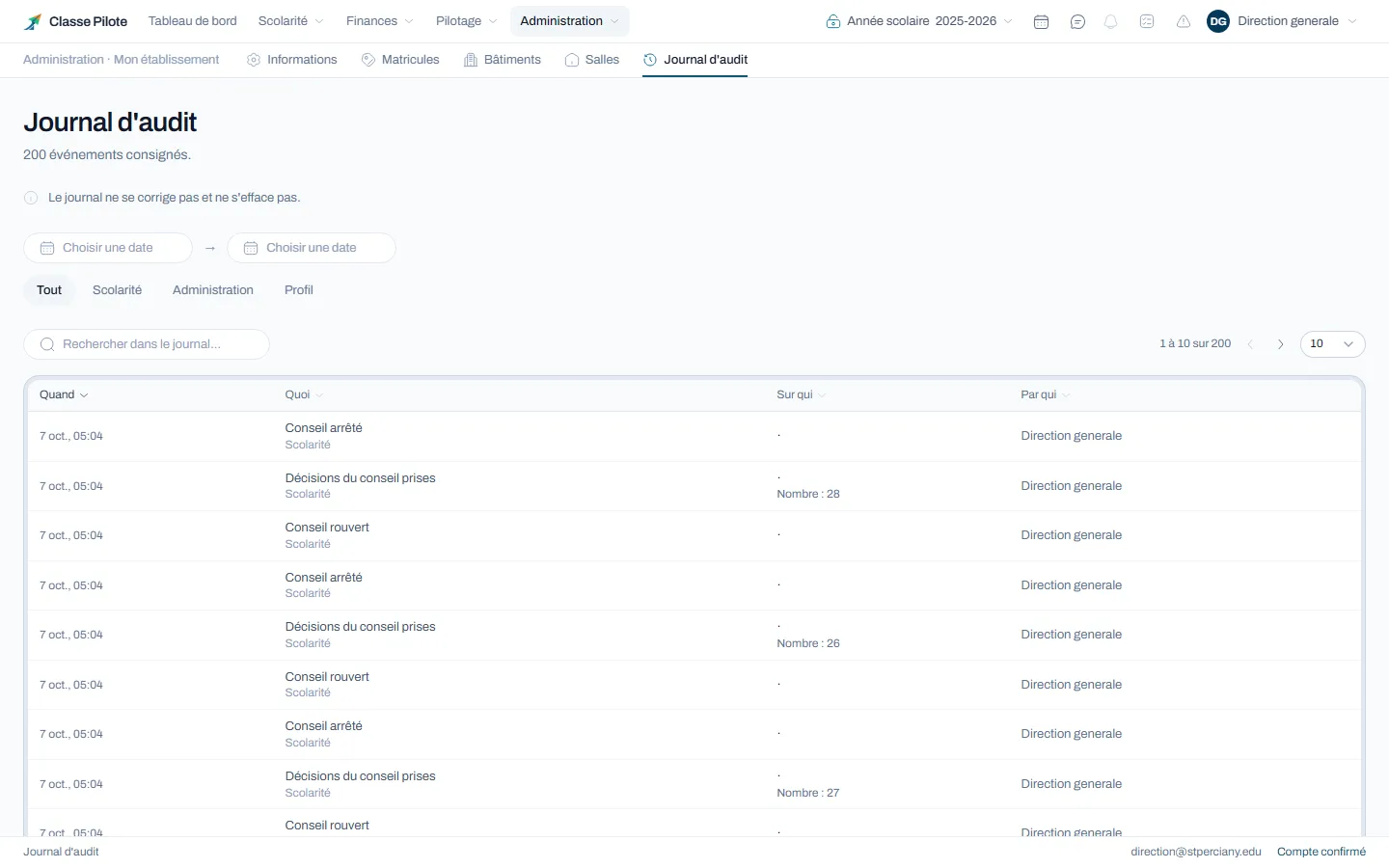
The audit journal: every action, its author and its date
Everyone accesses what concerns them
Access depends on each person’s role. Teachers see their classes and their marks, while the staff in charge of finance manages school fees.
Every action leaves a trace
A corrected mark, a recorded payment or a deactivated account: you can find who performed the action and when. The action history cannot be modified.
Your data belongs to you
You can export your data at any time in CSV, JSON or PDF. At the end of the contract, we hand it back to you before deleting it.
Your history stays accessible
A student who leaves the school, a deactivated account or a cancelled debt does not disappear from history. You keep a trace of past operations to find the information you need.

The bigger your school, the less you pay per student.

For 300 students, your subscription comes to 55.74 $ per month.

That comes to 0.19 $ per student and per month, so 668.86 $ for one year.

Need to send SMS to families? Pick the pack that suits you.

Try it free for 15 days

At the end of your 15-day trial, the subscription moves to 668.86 $ per year. You remain free to stop at any time.

How your subscription is computed

  • Up to 50 students10.72 $ per month, then 4.29 $ more per set of 20 students
  • From 51 to 200 students0.23 $ per student and per month
  • From 201 to 500 students0.19 $ per student and per month
  • From 501 to 1,000 students0.16 $ per student and per month
  • From 1,001 to 2,000 students0.14 $ per student and per month
  • Beyond 2,000 students0.11 $ per student and per month
  • Beyond 3,000 studentsContact us for a tailored price

We automatically apply the most advantageous computation for your school.

Everything included in your subscription

  • All features, at no extra cost
  • As many accounts as needed for your staff and teachers
  • A dedicated space for parents and another for students
  • Email notifications, free and unlimited
  • Import of your existing student lists for an easier start
  • Software updates and our support

Emails are included and unlimited. For SMS, simply pick a pack suited to your needs, valid for six months from purchase.

The questions you are asking

Does the software work without an internet connection?

An outage does not lose the data already recorded. As soon as the connection comes back, you can carry on normally.

Can we import our existing student lists?

You can import your students from a spreadsheet or your existing lists. We help you during the first migration, and you can keep your paper records while you check everything.

Will our team need training?

The software is used like a website: each screen only shows what matches each person’s role. We train the management and the secretary’s office in one session. Teachers then only have to enter attendance and marks.

How is data access managed?

Everyone only accesses the information tied to their role. Teachers see their classes, the secretary’s office handles records and collections, and the management supervises everything. Every sensitive action is recorded with its author and its date.

How is our data protected?

Your data is hosted on secure servers and is neither sold nor transferred. You can export it at any time in CSV, JSON or PDF. At the end of the contract, we hand it back to you and then delete it under the agreed terms.

How do we know the price of our subscription?

The subscription depends on the number of enrolled students, with no extra cost for staff or families. The 15-day trial is free of commitment and requires no bank card.